Remote Work
How to Manage Remote Teams Across Different Time Zones
Set shared working windows, use written handovers with named time zones, track on-time delivery and rotate meetings to avoid overtime.
6 min read

I’d start with clear working rules - not more meetings. Agree local hours, reserve 2–4 shared hours for live decisions, and give every task an owner and a deadline with a named time zone.
Here’s the approach I’d use:
- Write first: keep routine updates, decisions and handovers in one shared place.
- Set contact limits: measure response times within the recipient’s working hours and agree when urgent contact is allowed.
- Check the clocks: UK–South Africa overlap changes by one hour when UK clocks change. Check calendars and local holidays.
- Review delivery weekly: track deadlines, incomplete handovers and scheduling errors - not online status.
The aim? <u>Reliable delivery without routine out-of-hours work</u>. If work stalls, I’d fix the handover or schedule before extending anyone’s hours.
How to Manage Remote Teams Across Time Zones: Effective Strategies for Seamless Communication
sbb-itb-f12512f
Set shared hours and plan for UK clock changes
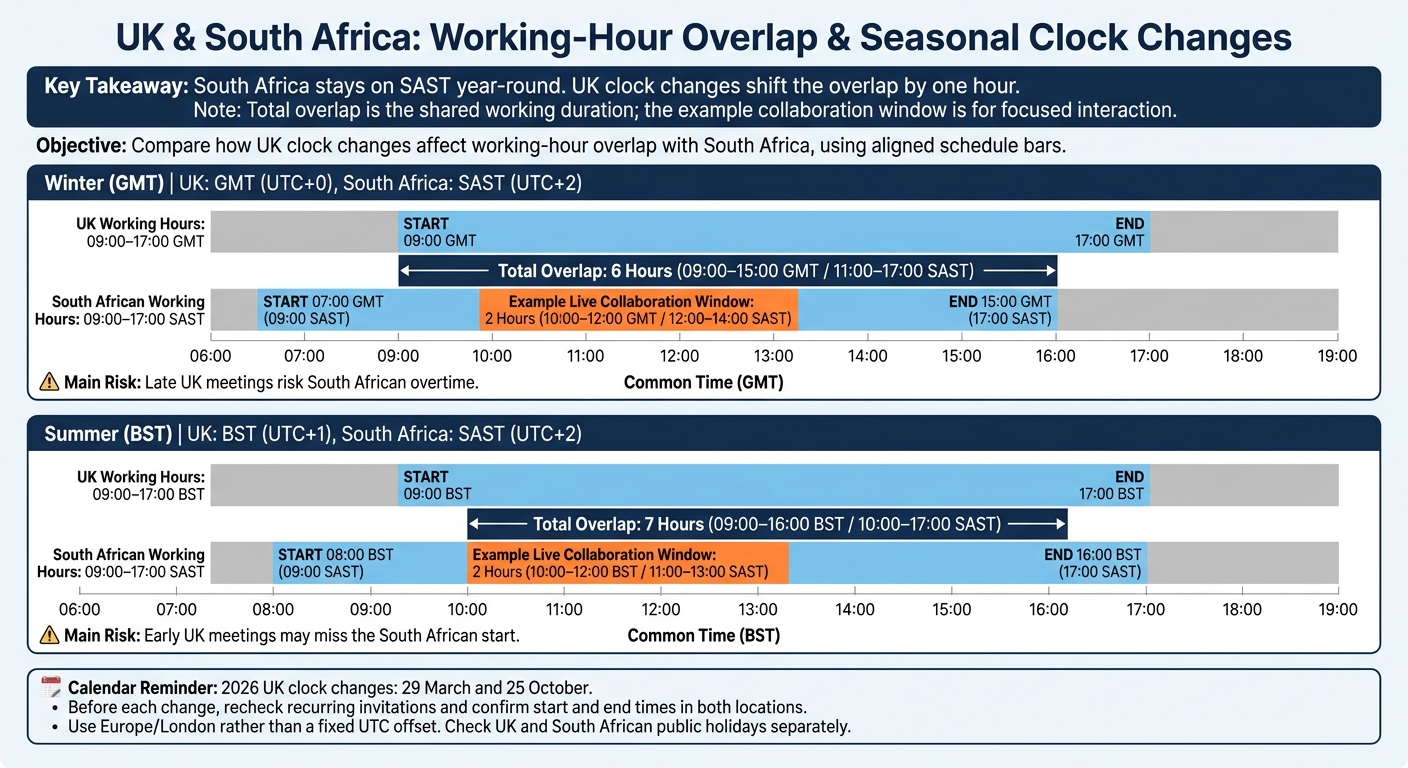
UK–South Africa Working Hours: Winter vs Summer
Turn the working agreement into a fixed window when everyone is available to work together.
Use shared hours for decisions and complex work
Reserve shared hours for live decisions and complex problem-solving, especially when written handovers leave an issue unresolved. Keep routine updates asynchronous. Publish the window in each person’s local time, and share the burden of unavoidable early or late calls.
Compare UK–South Africa winter and summer hours
Example: both teams work 09:00–17:00. South Africa stays on SAST (UTC+2); the UK uses GMT (UTC+0) or BST (UTC+1).
Use the table to see the overlap in both local times and choose a live-working window. This helps prevent missed handovers and pressure to work outside agreed hours.
UK season UK working hours South African working hours Total overlap Live collaboration window Main risk Winter (GMT) 09:00–17:00 GMT 09:00–17:00 SAST 09:00–15:00 GMT / 11:00–17:00 SAST - 6 hours 10:00–12:00 GMT / 12:00–14:00 SAST Late UK meetings risk South African overtime. Summer (BST) 09:00–17:00 BST 09:00–17:00 SAST 09:00–16:00 BST / 10:00–17:00 SAST - 7 hours 10:00–12:00 BST / 11:00–13:00 SAST Early UK meetings may miss the South African start.
Check recurring meetings before UK clock changes
Recheck the calendar before every UK daylight-saving change.
In 2026, UK clocks changed on 29 March and 25 October. Before each change, check recurring invitations and confirm start and end times in both locations, so South African colleagues do not lose late-day working time. Use Europe/London rather than a fixed UTC offset in calendar settings: this applies UK daylight-saving changes automatically. Check UK and South African public holidays separately.
Give every deadline a date, time, location and time zone rather than leaving colleagues to interpret “by 15:00”:
15:00, 9 November 2026, London time (GMT).
Set clear rules for written requests and handovers
Use the agreed overlap hours to set clear rules for requesting work, handing it over and escalating issues.
Give each request an action, owner and deadline
Start with the action. Then add the background, owner, priority, deadline and links, along with the objective, risk and decision-maker. Keep each request and its decisions in one shared thread.
Check the recipient’s recorded working hours to make sure they have enough work time before the deadline. This check applies only to this request.
Example request: Action: Review Q3 Revenue Schedule. Owner: [Name]. Deadline: 15:00 London time (GMT) on 9 November 2026. Background: [Link to docs]. Priority: Normal.
Set priority levels and out-of-hours limits
Keep acknowledgement windows separate from completion deadlines. Use the example rules below, tying each window to the responsible person’s local schedule and a named time zone, such as Europe/London or Africa/Johannesburg.
| Priority | Acknowledgement window | Escalation route | Out-of-hours contact |
|---|---|---|---|
| Normal request | One working day in the owner’s recorded time zone | Email or project ticket; follow up during working hours | Prohibited |
| Urgent blocker | Two working hours in the owner’s recorded time zone | Team chat (@mention) | Prohibited |
| Critical incident | One hour, only during explicitly agreed on-call cover in the owner’s recorded time zone | Phone or emergency alert | Permitted only within that cover |
If work crosses a non-working period, put the handover in writing.
Use a handover template with confirmation
Record every handover in the shared work log so the next colleague knows exactly where to pick up.
Completed: Finished work and links to records.
In progress: Current state and exact stopping point.
Next action: First task for the incoming colleague.
Blockers: Decisions, missing information or dependencies.
Owner: Person responsible next.
Deadline: Explicit date, time and time zone.
Confirmation: Incoming owner’s acknowledgement, time received and any questions.
Give the incoming owner a clear acknowledgement window, measured in their working hours. Flag missing information in the record and resolve questions during the next overlap - don’t silently accept an incomplete handover. Test the template on one routine handover before rolling it out to others.
Measure delivery, not online status
Once handovers are written, check whether they and the agreed overlap hours help work arrive on time. Judge performance by on-time delivery, not online status or hours logged. Use the work record to spot delays and missed handovers. Define “done” for each task so it means an accepted result, not just a status change.
Track deadlines, handovers and scheduling problems
Track on-time delivery, complete handovers and responses within agreed working hours. Record unresolved blockers and missed dependencies too. Together, these show where work stalls and whether the problem lies with the schedule, handover or response rule.
Log meetings moved or missed because of time-zone mistakes, along with repeated early or late calls by region. Keep out-of-hours messages separate from expectations of an immediate reply: a message left for the next shift is not the same as an urgent request.
Use these patterns to fix the process, not blame people.
Review delays weekly and update the agreement
Set aside 15–30 minutes during overlap hours each week to review missed handovers and delayed decisions. Check for unclear ownership, too little overlap or missing context. Let the record guide you towards the cause rather than a person to blame.
Give each process fix an owner and a deadline, then update the working agreement. Check the result the following week: did the handover arrive complete, or did the decision still stall? Fix the process before extending anyone’s hours.
Conclusion: make cross-time-zone work predictable
Make the working agreement the single source of truth once the rules are set. Record local hours using IANA time zones, keep a 2–4-hour shared window for live decisions and set response deadlines within working hours. Use written handovers so the next region can act without waiting.
Check recurring meetings before the UK clocks change in March and October. South Africa stays on SAST year-round, so the overlap shifts by one hour. Share the burden of early and late meetings by rotating them between regions.
Use the weekly delivery review to address missed handovers, delays and scheduling problems. Then update the working agreement to keep delivery reliable without routine out-of-hours work.
FAQs
What if our team has no overlapping working hours?
Make asynchronous communication the default. Write complete handovers so the next region can act without waiting. Document decisions in shared spaces, and set response-time expectations based on the task and its urgency - not whether someone is online.
Keep live meetings for work that needs real-time discussion, and record or summarise them so others can catch up. Hold people accountable for outcomes, not online presence, and agree escalation routes for urgent issues.
How do we handle urgent blockers outside agreed hours?
Set clear escalation routes, expected response times and a named contact for time-sensitive issues. Define what counts as an emergency and which channels to use. Contact colleagues outside their working hours only when the issue is urgent.
Give colleagues enough context in asynchronous messages to address issues efficiently when they return. These guidelines keep people accountable without expecting them to be available around the clock.
How can we keep meeting rotations fair?
Record each employee’s working hours and time zone, then rotate meeting times so early and late calls don’t always fall to the same people.
Give each meeting a clear purpose, record it for anyone who can’t attend, and write down clear action points. This keeps everyone on the same page without having to join every discussion in real time.