International Hiring
9 Tasks to Delegate to a Remote Admin Assistant
Delegate routine admin to a remote assistant, keep approval authority and measure net time reclaimed after two weeks.
11 min read

I’d start by delegating 1 or 2 routine admin tasks - not handing over every decision. Give your assistant a written checklist, limited access and clear approval rules, then review the work after a fortnight.
Here are nine tasks you can hand over:
- Inbox management: sort messages, draft replies and flag decisions.
- Calendar management: book appointments and protect focus time.
- Meeting support: prepare agendas and record agreed actions.
- Data entry: update spreadsheets and customer records.
- Document care: format, file and track versions.
- Travel planning: research options and arrange approved bookings.
- Expense tracking: collect receipts and match them to statements.
- Customer enquiries: answer routine questions using agreed replies.
- Follow-up reminders: chase replies, payments and assigned actions.
My rule: <u>delegate the admin, keep control of approvals</u>. Keep payment authority with you, refer pricing and legal matters for review, and check data protection requirements before granting overseas access.
After two weeks, measure time saved minus time spent briefing and checking. That tells you whether to add more tasks or fix the process first.
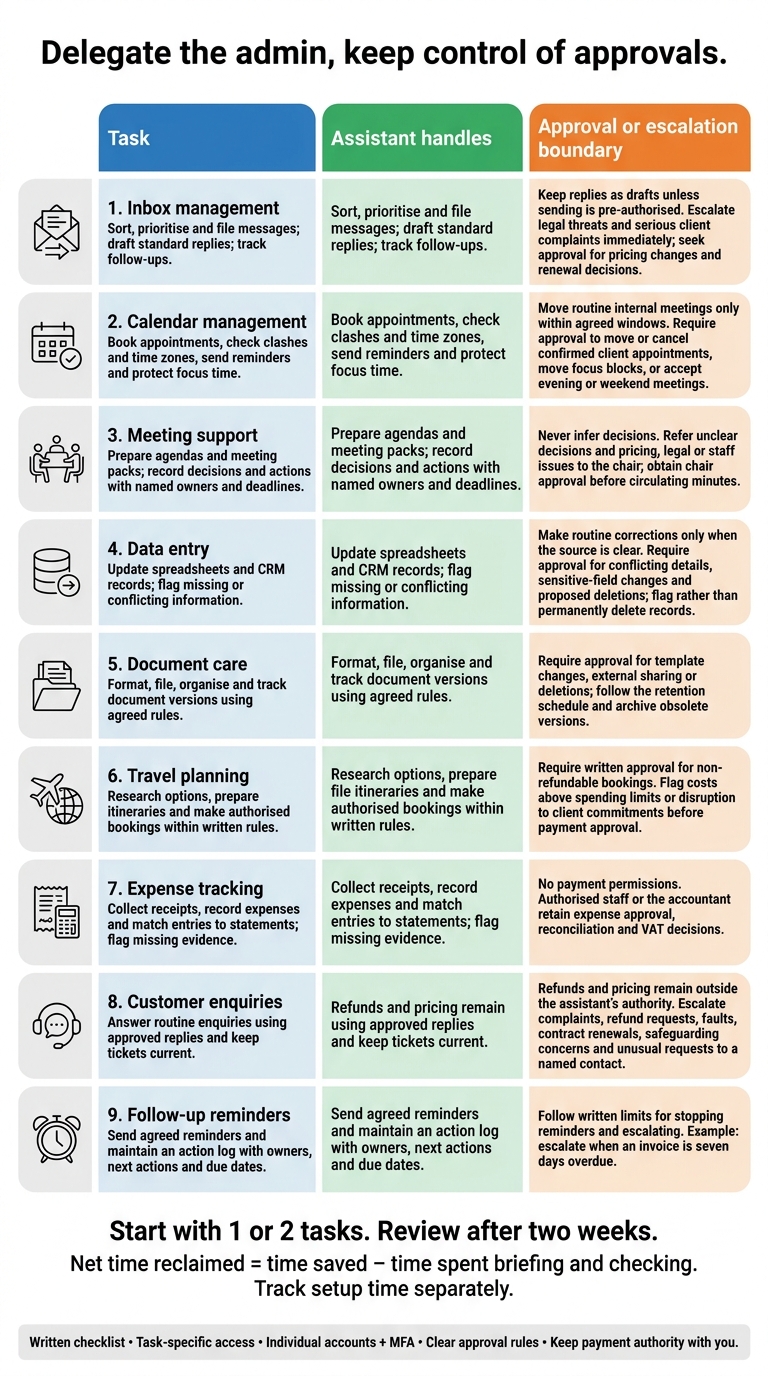
9 Remote Admin Assistant Tasks: What to Delegate and Approve
Agree Instructions and Access Before Delegating
Once the task is clear, put the instructions in writing. Create a one-page checklist and a short screen recording for each task. Include the steps, templates and an example showing the required standard, such as an agenda, meeting brief or itinerary. Define the output, deadline and how the work will be checked. Agree on a daily written update instead of relying on constant messages.
Put spending limits and approval rules for bookings and purchases in writing. Keep payment approval separate from expense preparation. Choose one escalation contact for pricing requests, complaints, renewals or anything with legal consequences.
Agree on working hours, response windows and time zones for everyone working in the UK or overseas. Use 24-hour times with a named zone, allowing for GMT/BST changes. For example:
14:00 GMT
Confirm which UK bank holidays and local holidays the assistant will observe, and who will provide cover.
Give the assistant individual accounts with task-specific access and multi-factor authentication. Store credentials in a password manager, avoid shared logins and grant only the access each task needs. Record confidentiality terms and approved storage rules in writing. Before allowing overseas access to UK personal data, confirm the UK GDPR processor contract and transfer safeguards.
Keep a style guide alongside the procedures. Cover British spelling, dates and sterling amounts:
“organise”
2 November 2026
£1,250.50
Apply these standards to emails, calendar entries, documents and expense records.
sbb-itb-f12512f
1. Manage Your Inbox
With access and approval rules in place, start with the inbox - the fastest admin task to systemise. A well-managed inbox puts urgent messages first, prepares routine replies and cuts interruptions.
Tasks the assistant handles
The assistant sorts, prioritises and files messages, drafts standard replies, and flags anything that needs your decision.
Expected deliverables
Ask for a priority inbox, a daily exception list of decisions only you can make, and a follow-up log for outstanding replies, approvals and commitments. Every open item should include an owner, next action and due date.
Required instructions and access
Provide approved reply patterns for your ten most common email requests. Define which folders the assistant can view, which messages must stay private, and which contact groups, folders and labels they can use. Set a target of one working day for replies to routine enquiries, with drafts ready in time for your review.
Approval and escalation boundaries
Keep replies as drafts unless sending has been pre-authorised. Direct routine account queries to the right owner. Escalate legal threats and serious client complaints immediately, and flag pricing changes and renewal decisions for your approval.
Once inbox handling runs smoothly, apply the same process to scheduling.
2. Schedule Appointments and Manage Your Calendar
Tasks the assistant handles
Your assistant books, reschedules and cancels appointments, checks for clashes, accounts for time zones, and sends updated invitations and reminders. They also protect focus blocks and add preparation time, meeting links and locations.
Expected deliverables
Expect an up-to-date calendar with confirmed attendees and clearly labelled priorities. Every invitation should include an agenda, pre-reads and a meeting link or location, so your assistant can help you prepare before each meeting.
Required instructions and access
Give your assistant calendar-only edit access, with separate approval rights for cancellations and client-facing changes. Specify your working hours, meeting windows and protected focus time.
Set 15–30-minute transition buffers between appointments. For major meetings, request pre-reads two working days in advance.
South Africa is two hours ahead of the UK during GMT and one hour ahead during BST. Review recurring appointments two weeks before the UK’s March and October clock changes.
Approval and escalation boundaries
Let your assistant move routine internal meetings within agreed windows. Require approval before they move or cancel confirmed client appointments, move focus blocks, or accept evening or weekend meetings.
When priorities clash, your assistant should explain the trade-off and recommend one option.
3. Prepare Meetings and Write Minutes
Once the meeting is scheduled, delegate the preparation and minute-taking. You’re handing over the admin, not the meeting itself.
Tasks the assistant handles
Your assistant drafts the agenda, gathers pre-reads and confirms attendance. During the meeting, they record decisions and actions, rather than a full transcript.
Expected deliverables
Before the call, expect a meeting pack with the agenda, background materials, pre-reads and attendance list. Afterwards, the assistant prepares concise minutes with named owners and deadlines.
Required instructions and access
Share templates, the meeting purpose, stakeholder details and a model pack. Give access only to the folders needed, and specify who approves the agenda, minutes and circulation list.
Approval and escalation boundaries
The assistant must never infer decisions. They should refer unclear decisions and any pricing, legal or staff issues to the chair, then get the chair’s approval before circulating the minutes.
The same structure can guide data entry and record updates after the meeting.
4. Enter Data and Update Records
Hand over the admin work that keeps your CRM, spreadsheets and logs up to date.
Tasks the assistant handles
After meetings and client updates, delegate standardised spreadsheet entries, CRM tagging, activity logging and customer record updates. The assistant also removes duplicates and flags outdated or conflicting details.
Expected deliverables
Expect consistent, standardised records and a data exception log that lists missing or conflicting information for review. Each log entry should identify the record, explain the issue and state what follow-up is needed.
Required instructions and access
Provide field definitions, required fields, dropdown values and naming rules. Specify DD/MM/YYYY for dates and £0.00 for sterling amounts. Give each user an individual login with MFA, restrict editing to the fields they need and block bulk exports unless required.
Approval and escalation boundaries
Allow routine corrections only when the source is clear. Require approval for conflicting details, changes to sensitive fields and proposed deletions. Flag records for review rather than deleting them permanently.
Apply the same standards to document formatting and filing.
5. Format and File Documents
Tasks the assistant handles
Once records are updated, keep the related documents tidy and current. The assistant can organise cloud folders, manage version control and archive obsolete versions. They can also format reports, proposals, spreadsheets and presentations using approved styles.
Expected deliverables
Expect clean, consistently formatted documents in one approved location, with clear version histories. Reports, proposals and supporting files should stay aligned with the records they support.
Required instructions and access
Provide approved templates, a brand style guide and a one-page checklist covering file names, folder structure and version labels. Make clear where each file type belongs.
Approval and escalation boundaries
Allow formatting and filing within the agreed rules. Require approval for template changes, external sharing or deletions. Follow the retention schedule, archiving obsolete versions rather than deleting them.
6. Arrange Business Travel
Once your records and documents are in order, hand over travel planning. It takes time, but the steps are largely repeatable - a good fit for delegation.
Tasks the assistant handles
The assistant researches flights, accommodation and ground transport around your schedule and preferences. They then make authorised bookings, coordinate transfers and manage rescheduling or cancellations within agreed rules.
Expected deliverables
Expect one up-to-date itinerary with UK-format dates (DD/MM/YYYY), departure and arrival times in local time, booking references, cancellation terms, costs in £, and supplier or emergency contacts. The assistant should update it whenever travel plans change.
Required instructions and access
Give the assistant written travel preferences and spending limits. Include preferred airlines and hotel chains, seat choices and clear rules for making decisions. Share loyalty details and a previous itinerary that worked well as a model.
Approval and escalation boundaries
Require written approval for non-refundable bookings. Set out which refundable bookings the assistant can make without approval and which changes they must refer to you.
Before you approve payment, the assistant should flag any costs above your limits or disruption to client commitments. They should also recommend an option and explain its trade-offs.
7. Track Expenses and Receipts
Tasks the assistant handles
Once travel is booked, hand over receipt collection and statement matching. The assistant gathers receipts and invoices from a dedicated inbox or folder, then records the date, supplier, category, amount and VAT details. They check entries against statements to flag missing receipts, unmatched transactions and differences in amounts.
Expected deliverables
Expect an expense log in £, with receipt links and a matching status for each item. A separate ‘Missing Evidence’ list shows any gaps before internal approval or accountant review.
Required instructions and access
Provide approved expense categories, spending limits and a weekly deadline for missing receipts. Give the assistant role-based access to your expense software and view-only access to statements, with no payment permissions. Specify which VAT fields they should record from standard supplier invoices.
Approval and escalation boundaries
The assistant should flag unusual costs for review. They handle record-keeping and statement matching, while authorised staff or your accountant retain responsibility for expense approval, reconciliation and VAT decisions.
Once expense controls are working, the same rule-based approach can handle routine customer messages.
8. Respond to Routine Customer Enquiries
Once back-office admin is running smoothly, use the same rules to delegate routine customer enquiries.
Tasks the assistant handles
Hand over routine customer emails, chats and helpdesk tickets about order status, stock levels and standard service queries. The assistant checks order, stock and account records, sends approved replies and passes enquiries to the right team when needed.
Expected deliverables
Expect timely, consistent replies and up-to-date tickets. Each record should include the customer’s request, the response and the ticket’s status.
Required instructions and access
Create an approved reply library for your 10 most common enquiries, using current order, stock and service data. Set response-time targets and coverage hours. Limit access to the customer records and helpdesk functions the assistant needs for these tasks.
Approval and escalation boundaries
Allow routine replies, but keep refunds and pricing outside the assistant’s authority. Pass complaints, refund requests, faults, contract renewals, safeguarding concerns and unusual requests to a named contact. Document who to contact and how to hand over each type of enquiry.
9. Send Follow-up Reminders
Apply the same tracking discipline to requests and tasks that are still open.
Tasks the assistant handles
Hand over follow-ups on open requests, overdue invoices and assigned actions. The assistant checks deadlines, sends polite reminders and logs replies, keeping delegated admin on track.
Expected deliverables
Maintain one live action log with contacts, owners, next actions, due dates, the last update and escalation status. Request a weekly summary of overdue items, approaching deadlines and any escalations.
Required instructions and access
Supply approved reminder wording and access to the relevant CRM, project board and invoice records. Set a fixed schedule for each task type, matching payment terms where relevant:
Every three days for quotes and every seven days for invoices.
Log every follow-up so the next reminder takes account of the latest reply.
Approval and escalation boundaries
Allow the assistant to send agreed reminders, but set clear limits on when chasing stops and escalation begins:
Escalate when an invoice is seven days overdue.
Start with one reminder stream. Add others once the process is stable.
Start with 1 or 2 Tasks and Review After a Fortnight
Start with a short pilot before adding more to the role. Try inbox triage or calendar scheduling, and add tasks only once the first process works. Set a daily cut-off time for completed work. The aim is to check that the role saves time before you expand it.
During the first fortnight, hold brief daily check-ins to answer recurring questions. Ask the assistant to document each step as they work, then update the checklist straight away.
At the two-week review, check accuracy, turnaround times and unresolved issues. How much work needed correcting? Were deadlines met? Which items are still stuck? Work out whether problems stem from training or the process itself, separating gaps in instructions and access issues from process errors.
Measure net time reclaimed: time saved minus time spent briefing and checking. Track setup time separately.
Turn recurring questions into checklist updates, then approve the assistant’s revised instructions. Switch to weekly reviews once routine work is reliable, and add more work only when the first tasks run smoothly.
Conclusion
These nine tasks cut routine admin when you set clear outputs, access rules and approval limits. Start with the bottleneck that disrupts your work most, and spell out what the finished work should look like before handing it over.
Set out what the assistant can view, edit or send, which actions need your approval and when to escalate. Keep payment authority with you, and send pricing, legal and service issues for review.
FAQs
How do I choose which admin tasks to delegate first?
Start with a two-week audit of recurring admin tasks that eat into your time. Prioritise frequent tasks that need little context or judgement, such as inbox triage, calendar scheduling, data entry and basic document formatting. They follow clear rules, are easy to document and offer the fastest return on your time.
Hold back sensitive tasks or responsibilities that require more judgement until you’ve built trust, developed your working relationship and put clear documentation in place.
What UK GDPR safeguards do I need for an overseas assistant?
Make data security a core requirement. Set up role-based access controls so the assistant can access only the information they need for their tasks. Use a professional password manager rather than sharing login credentials, and enable two-factor authentication on every platform.
Put clear confidentiality agreements in place. Define how sensitive materials must be stored, shared and disposed of within approved company systems.
How can I check quality without micromanaging?
Focus on outcomes, not individual actions. Agree on clear targets, such as turnaround times or error rates, then review results instead of checking every task.
Delegate whole workflows, with clear rules for decisions, boundaries and when to escalate. If the same questions keep coming up, add a screen recording or checklist to your documentation rather than assuming there’s a performance problem. A weekly review lets you keep track while giving your assistant ownership of the process.