Remote Work
Remote Onboarding Checklist: A New Hire’s First Week
A practical week-one remote onboarding checklist that gets new hires connected, trained and productive with named owners and check-ins.
7 min read

My goal for week one: help your remote new hire get connected, understand their role and complete a first task. I give every checklist item a named owner and deadline, and book 15-minute daily manager check-ins.
Here’s how I split the week:
- Before day one: Sort equipment, accounts and paperwork; share the schedule and support contacts.
- Day one: Test secure access, introduce the team and agree communication rules.
- Days two to four: Cover priorities, workflows and training, then assign and review a small task.
- Day five: Check readiness, ask for feedback and agree 2–3 week-two deliverables.
For UK–South Africa teams, I confirm shared working hours in both time zones. I keep progress and blockers in <u>one shared checklist</u>, so everyone knows who does what next.
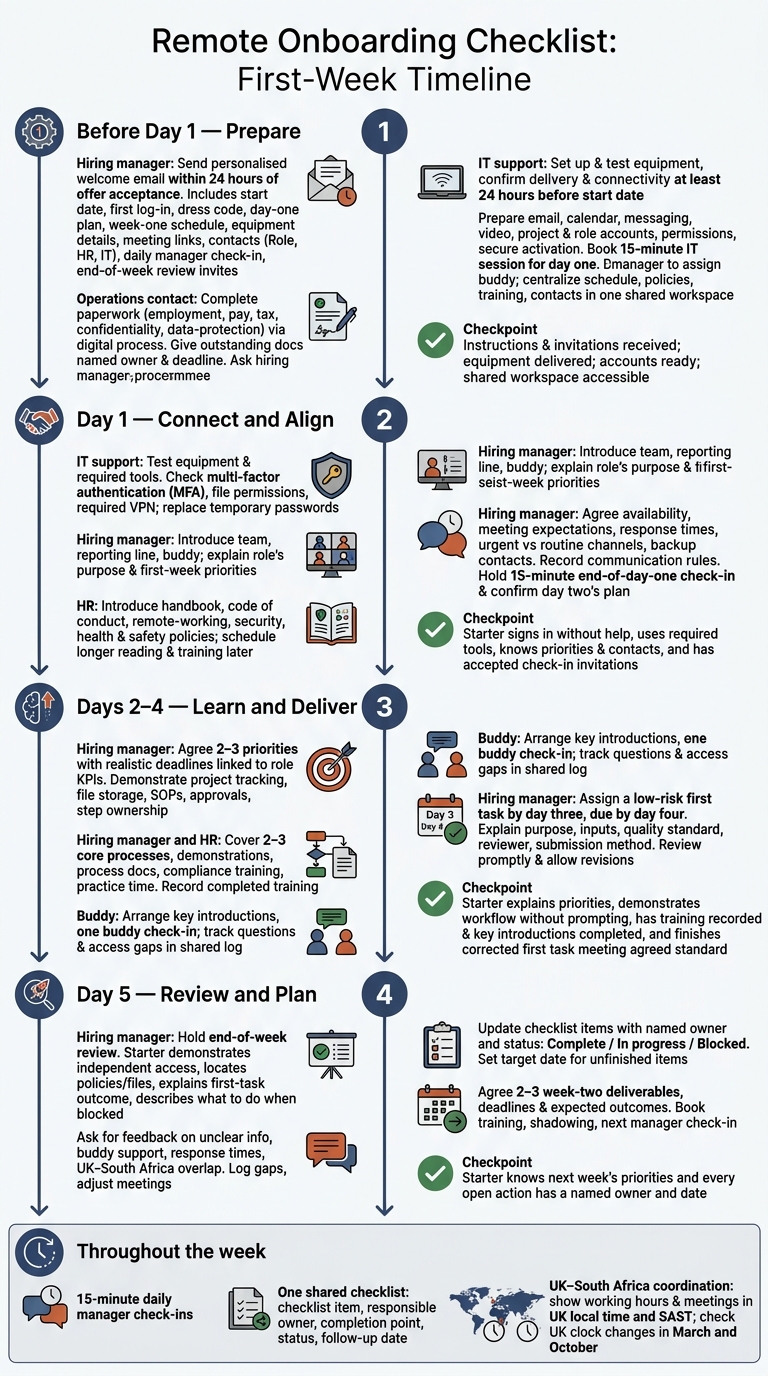
Remote Onboarding Checklist: First-Week Timeline
How to Onboard a New Employee Virtually
sbb-itb-f12512f
Before Day 1: Prepare for the Start Date
Clear these blockers before the starter logs in on day one.
Confirm Working Hours and Send a Welcome Email
☐ Hiring manager: Send a personalised welcome email within 24 hours of offer acceptance. Include the start date, first log-in time, dress code, a brief day-one plan and the week-one schedule. Add equipment-delivery details, virtual meeting links and named contacts for role questions, HR processes and technical problems.
Complete when: the starter has received the instructions and calendar invitations for daily manager check-ins and the end-of-week 1-on-1.
Show working hours and meeting times in both UK local time and SAST. Check UK clock changes in March and October before sending invitations.
Prepare Equipment and Account Access
☐ IT support: Set up and test the laptop, headset and any other required equipment before dispatch. Confirm delivery and connectivity at least 24 hours before the start date. Keep delivery or access problems with IT support until they are resolved.
Prepare email, calendar, messaging, video, project-management and role-specific accounts. Check permissions and provide secure activation instructions for each account.
Complete when: equipment has arrived, accounts are ready and a 15-minute IT session is booked for day one to check the starter’s access.
Complete Paperwork and Share the Checklist
☐ Operations contact: Complete all applicable employment or engagement, pay, tax, confidentiality and data-protection documents through the approved digital process. Assign a named owner and deadline to each outstanding document.
Ask the hiring manager to assign a buddy. Bring the schedule, policies, training and contacts together in a shared workspace. Use it to track each checklist item’s owner, deadline and completion status.
Complete when: the starter can open the shared workspace.
Day 1: Test Access and Welcome the Starter
With pre-start blockers cleared, use day one to test access, set expectations and agree how to communicate. The starter should finish the day connected, briefed and on track to work by the end of week one. Record each blocker, its owner and the next action in the shared checklist.
Test Equipment and Security Settings
☐ IT support: Use the booked session to test the laptop, monitors, headset, webcam and any required proprietary hardware. Ask the starter to send an email, open calendar invitations and use chat, HR/payroll and role-specific software. Check multi-factor authentication (MFA), file permissions and any required VPN, then replace temporary passwords.
Complete when: the starter can sign in without help and use the required tools.
Once access works, move on to introductions and role expectations.
Introduce the Team and Explain Policies
☐ Hiring manager: Lead a welcome call covering today’s timetable, the role’s purpose, the reporting line and first-week priorities. Introduce the team, explain what each person does and introduce the buddy.
HR: Cover the handbook, code of conduct, remote-working, information security, and health and safety. Schedule longer reading and training for later in the week.
Complete when: the starter knows their immediate priorities and who to ask about their role, policies and everyday questions.
Next, agree how the team will communicate during the week.
Agree Communication Rules and Book Check-ins
☐ Hiring manager: Confirm shared UK–South Africa working hours in both time zones. Agree availability, meeting expectations and response times. Set out which channels to use for urgent requests, routine questions and progress updates. Explain what counts as urgent and who to contact when the main contact is unavailable.
Check that calendar invitations include a 15-minute end-of-day-one check-in, a mid-week check-in and the end-of-week review. Use the first wrap-up to discuss blockers, answer questions and confirm day two’s plan.
Complete when: communication rules are recorded and the starter has accepted the check-in invitations.
Days 2–4: Learn the Role and Complete a First Task
Set Priorities and Explain Workflows
Once access and communication are in place, cover the role’s basics and how work gets done.
☐ Hiring manager: Review responsibilities and agree 2–3 priorities with realistic deadlines linked to the role’s KPIs. Show how to track projects, store files, follow standard operating procedures and get approvals. Explain who owns each step.
Complete when: the starter can explain their priorities and demonstrate the main workflow without prompting.
Complete Training and Meet Key Contacts
☐ Hiring manager and HR: Focus on the 2–3 core processes through demonstrations, process documents and compliance training. Allow time to practise after each session, and check that training is complete before adding responsibilities.
Complete when: the starter can carry out the practised steps and their learning has been recorded.
☐ Buddy: Arrange short introductions with regular contacts and one buddy check-in to discuss working habits and questions. Use shared UK–South Africa working hours for shadowing and questions. Keep unanswered questions and access gaps in one shared log to revisit at the next check-in.
Complete when: key introductions have taken place and outstanding gaps are being tracked.
After the starter has practised the core steps, give them a small task to put those skills to use.
Assign and Review a Small First Task
☐ Hiring manager: Assign a low-risk task by day three, due by day four. Explain its purpose, the inputs, the quality standard, who will review it and how to submit it. Review the work promptly, note any fixes needed and let the starter revise it.
Complete when: the corrected task meets the agreed standard and is marked complete in the checklist.
Day 5: Review Progress and Plan Week 2
Use the final check-in to confirm the starter has the connections and equipment they need to work independently by the end of week one. Clear any blockers before week two.
Check Readiness and Ask for Feedback
☐ Hiring manager: Hold an end-of-week review. Ask the starter to demonstrate independent access, find policies and files, and explain the outcome of their first task. Check they know what to do if they get blocked.
Ask what was unclear, whether the buddy helped and whether they understand expected response times. Check that the UK–South Africa overlap leaves enough time for questions without stretching agreed working hours. Adjust meetings if needed. Complete when: the starter can work independently and any gaps are logged.
Use their feedback to update the checklist and agree actions for week two.
Record Checklist Status and Set Next Steps
☐ Hiring manager: Update the shared checklist using the fields below. Give each item one named owner and mark it Complete / In progress / Blocked. Set a target date for every unfinished item.
| Checklist item | Responsible owner | Completion point | Status | Follow-up date |
|---|---|---|---|---|
| Equipment and secure access | Named IT contact | Starter demonstrates independent access | Complete / In progress / Blocked | Set if unfinished |
| Training and team connections | Named manager or buddy | Training recorded; key contacts reached | Complete / In progress / Blocked | Set if unfinished |
| Role clarity and first task | Named hiring manager | Expectations understood; review outcome recorded | Complete / In progress / Blocked | Set if unfinished |
Agree 2–3 week-two deliverables, each with a deadline and expected outcome. Before ending the review, book training, shadowing and the next manager check-in. Complete when: the starter knows next week’s priorities and every open action has a named owner and date.
FAQs
What if equipment delays disrupt my new starter’s first week?
Keep your new starter connected while IT tracks their shipment. Give them access to key cloud-based resources, such as the company handbook or onboarding checklist, that they can view on a personal device.
Arrange regular, informal video check-ins so they feel supported and part of the team. Focus on training modules or virtual meet-and-greets that don’t need specific hardware, helping them stay involved while they wait.
How much UK–South Africa working-hour overlap do we need?
UK and South African teams share a full working day of overlap. South Africa is one hour ahead of the UK during British Summer Time and two hours ahead in winter.
That small time difference makes it easier to work together, especially in support, sales and operations. Teams can keep up regular communication and schedule routine manager check-ins.
What if my new hire needs more support after week one?
Onboarding doesn’t end after the first week. Keep regular check-ins for at least 90 days to answer questions and respond as needs change. Pair your new hire with a dedicated peer buddy they can turn to for guidance throughout this period.
Set clear milestones and schedule feedback sessions in your 30-, 60- and 90-day plans to spot gaps early. Stay in touch consistently, rather than waiting for questions or problems, so your new hire feels supported as they work towards full productivity.